AngleForge
Home & kitchen · Product photography

AI furniture product photography

Furniture is a big purchase made without sitting on it, so the photos have to prove size, proportion and finish. AngleForge turns a clear photo of your chair, table, sofa or shelf into a white main image, front, side and top views, close-ups of fabric and grain, and room scenes, ready to export for Amazon, Walmart and Flipkart.
  • Dining & accent chairs
  • Coffee & dining tables
  • Sofas & armchairs
  • Shelves & bookcases
  • Flat-pack furniture
  • Bedside tables & sideboards
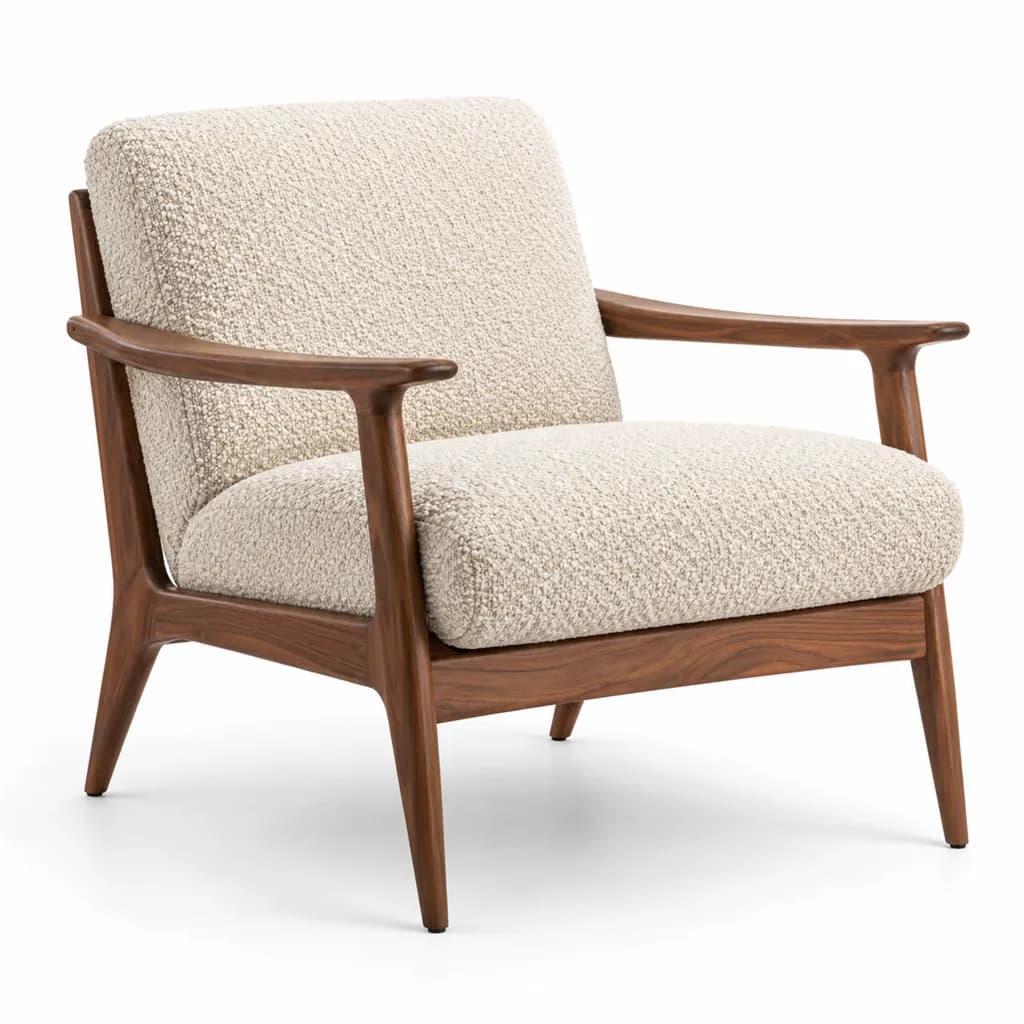
AI-generated hero shot: a mid-century accent armchair with a solid walnut frame
Hero
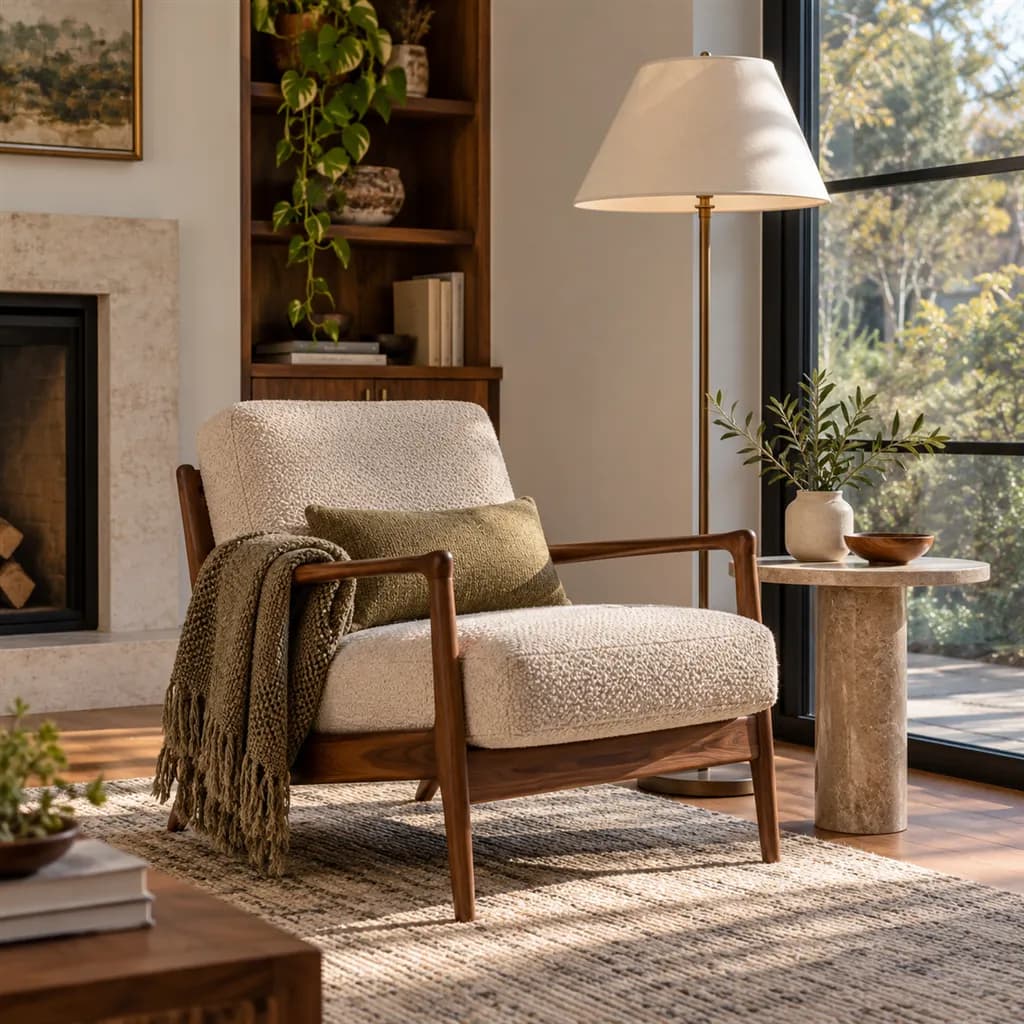
AI-generated lifestyle scene: a mid-century armchair with a walnut frame and oatmeal boucle upholstery beside a tall window in a calm living room
Lifestyle

Sample images AI-generated from a text description. Yours are made from your own product photo.

Furniture is one of the hardest home categories to photograph yourself. The pieces are big, so you need floor space, plenty of even light and a lens that keeps straight lines straight. Buyers read proportions from the images (seat height, depth, how chunky the arms are), and a wide phone shot taken up close stretches the front and shrinks the back. Fabric shifts colour between daylight and room lights, dark wood loses its grain in shadow, and a sofa alone on white tells nobody whether it will fit under their window.

A good furniture listing answers the tape-measure questions in pictures. The main image shows the whole piece on white; straight-on and profile views make the dimensions easy to follow; a view from above settles a tabletop's shape or which side a chaise sits on; and room scenes put the piece beside doors, windows and other furniture so its size makes sense. AngleForge keeps your piece as you photographed it and builds every view and room around it, which makes the photo you upload the most important step: the whole piece in frame, sharp, shot from a few steps back.

What shoppers check

The questions your photos have to answer

Will it fit my room?

Room scenes with a window, a door or a rug in view give a quick sense of size. Back them with a dimensions image so buyers can check the numbers against their tape measure.

How deep is the seat, and how high are the arms?

The Side shot shows the profile: seat depth, back angle, arm height and leg rake, the proportions people compare with the chair they already have.

What do the upholstery and wood look like close up?

A Detail shot of the weave, the grain or a joint shows the build: boucle loops, oak figure, a dovetail or a straight, even seam.

Which way round does the sectional go?

A Top-down view shows a sectional's layout or a tabletop's shape, so a buyer with a corner on the left knows which chaise to order.

What arrives in the box?

For flat-pack, a photo of the boards and fittings laid out shows the assembly job before anyone buys. AngleForge keeps the parts as you laid them out, so the layout stays truthful.

The shot list

Shots that sell furniture

A set of 8 images includes every shot on this list, because each set uses the angles in order. That is 16 credits at 2 credits an image.

  1. 1

    Hero

    The whole piece on white with nothing cropped: legs, feet and the top of a tall bookcase all in frame.

  2. 2

    Front

    Straight-on with no perspective, the clearest view to pair with width and height measurements.

  3. 3

    45°

    The angle most furniture sells on: front and one side at once, so depth and the style of arms and legs read together.

  4. 4

    Side

    Seat depth, back rake, shelf depth and leg angle, the proportions buyers check against what they own.

  5. 5

    Top-down

    A tabletop's shape and grain, or a sectional's layout seen from above.

  6. 6

    Detail

    Weave, grain, joinery, stitching or hardware, close enough to judge how it's made.

  7. 7

    Lifestyle

    On the Lifestyle scene background this becomes the room shot: the piece next to a window or a rug, which is how buyers judge size.

Settings to use

Start with these in AngleForge

Category
Home
Lighting mood
Studio
Background
Cut-out white
Set size
8 images
Open with these settings

6 free credits on sign-up for 3 test images · no card needed

Example brief

“Mid-century armchair with a walnut frame and oatmeal boucle upholstery. Keep the fabric texture, the wood colour and the proportions exactly as photographed; even, neutral light that shows the grain.”

Styling and light

  • Photograph from a few steps back at about half the piece's height, using your phone's 2× lens if it has one. Up close with a wide lens, arms balloon and the back shrinks, and every angle inherits that distortion.
  • Clear the space around the piece and light it evenly: a bright room, daylight from the side, room lights off, so fabric colour stays true and dark wood keeps its grain.
  • Show it fully assembled and dressed as sold: cushions plumped and square, drawers closed, nothing on top that isn't included.
  • Match room scenes to the piece (a walnut sideboard in a mid-century living room, a rattan chair in a bright sunroom), name the room in the brief, and check the piece still looks its real size beside doors and windows.
Marketplace rules

What each marketplace expects

Rules change, so check the current category guide in your seller dashboard before you upload.

Amazon

  • Seller guides summarising Amazon's style guide say the main image shows the entire product on pure white, uncropped and without props. For a dining set, that points to the table and every chair, with the fruit bowl left out.
  • The same guides name beds, bed frames, mattresses and sofas among the few categories that may use a room scene as the main image. Check the current Furniture style guide in Seller Central before relying on it.
All Amazon image requirements

Walmart

  • Walmart's image guide prefers a seamless white main image but lets larger items appear in an expected environment, and the main image still can't show accessories that aren't sold with the item.
  • Walmart Canada's furniture content guide asks for a direct or angled front view as the primary image, all pieces of a set shown together, extra views of anything that folds or adjusts, and furniture shown near doors or windows so buyers can judge its size.
All Walmart image requirements

Flipkart

  • Integration guides quoting Flipkart's image rules ask for a white primary image with the product alone, and images that aren't cropped, stretched or blurred, which rules out a sofa with an arm cut off by the frame.
  • The number of images allowed differs by category, so check the furniture catalog guidelines in Seller Hub before you upload.
All Flipkart image requirements

Common furniture photo mistakes

  • Wide-angle distortion from shooting up close: oversized arms, a shrunken back, legs that splay.
  • Legs, feet or the top of a tall bookcase cropped off in the main image.
  • No dimensions image, leaving buyers to guess whether it fits through the door.
  • Room scenes where the piece looks larger or smaller than it is next to doors and windows.
  • A generated rear view used to suggest a finished back that your photo never showed.
FAQ

Furniture photography questions

Does AI product photography work for sofas and other large pieces?
Yes, as long as the whole piece is in your photo. Shoot it in a clear space from a few steps back, in even daylight, with nothing cropped. AngleForge keeps the sofa as photographed and builds each view and room around it, but it can't recover an arm or a leg that was out of frame.
Can I get white main images and room scenes?
Yes, as two sets. The background you pick applies to every image in a set, so run the recommended set on Cut-out white for marketplace images, then a smaller set on the Lifestyle scene background for rooms, with the room described in the brief.
How do I add dimensions to furniture photos?
The angle tool doesn't draw measurements. Make a dimensions image with the Amazon listing image generator, which builds a seven-image gallery with a dimensions slot and text callouts. Walmart Canada's furniture guide measures width and depth with the piece's back against a wall, a sensible convention for any marketplace.
Can it show flat-pack parts?
Photograph the boards, fittings and tools laid out flat and run that photo as its own small set: its Hero and Top-down shots show what's in the box. The product stays as photographed, so the layout shows exactly the parts you laid out. Check the count against your instructions.
How much does a furniture set cost?
Each image costs 2 credits. The 8-image white set recommended here is 16 credits, and a 4-image room set on the Lifestyle scene background adds 8, so 24 credits covers both. New accounts get 6 free credits to test 3 images, and packs start at $12 for 30 credits.

Related categories

Selling on Amazon?

Related guides

Your next listing, ready today

Sign up, upload a photo and your first image is ready in about 30 seconds. Make 3 images free, then pick a pack or plan. Your first credit pack comes with 50% extra credits.

  • 3 free images
  • No card needed
  • Failed images refunded