AngleForge
Home & kitchen · Product photography

AI kitchenware product photography

Kitchenware buyers want to know what a pan is made of, what comes in the set and how big it really is, and they check the photos for all three. AngleForge turns a photo of your pan, utensil set, container or gadget into a white main image, three-quarter and profile views, interiors from above, close-ups of coatings and rivets, and kitchen scenes for Amazon, Flipkart and Shopify.
  • Pots & pans
  • Cookware sets
  • Utensils & tools
  • Food storage containers
  • Kitchen gadgets
  • Bakeware
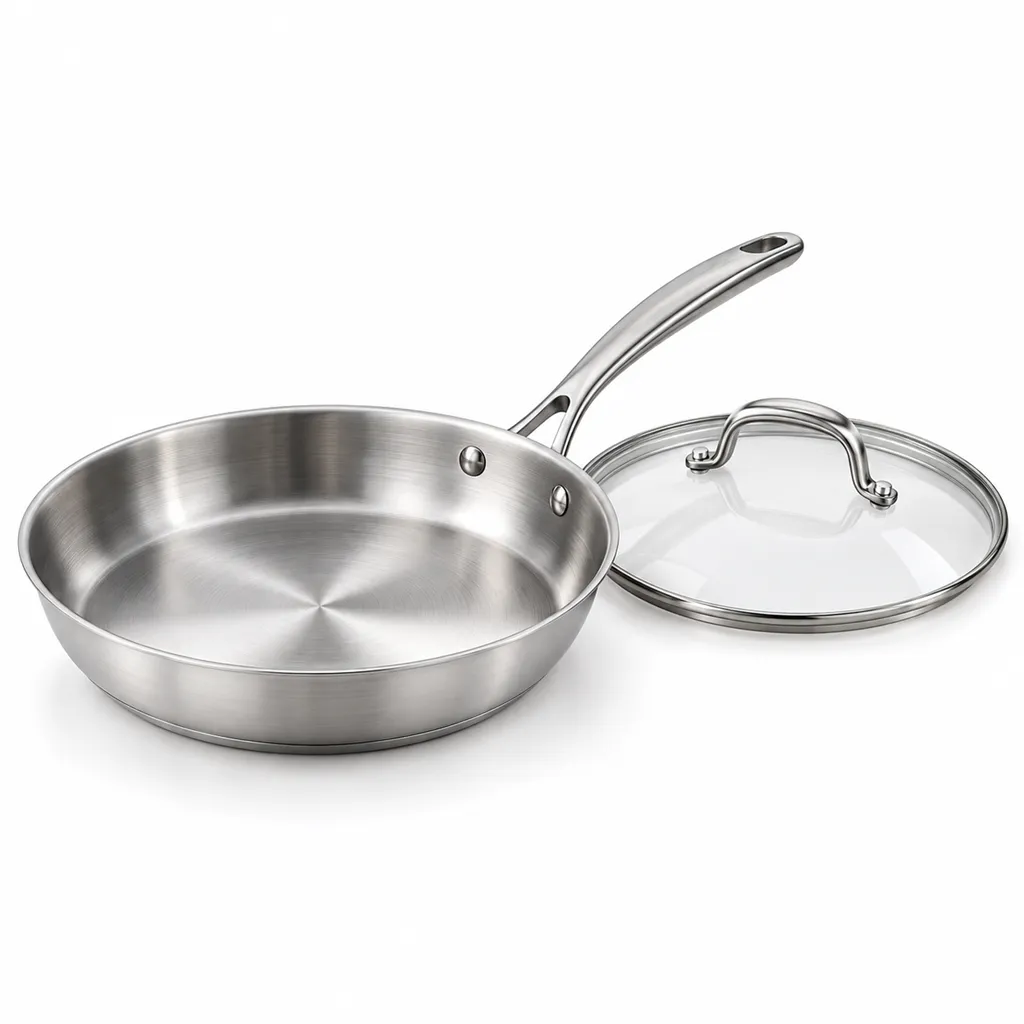
AI-generated hero shot: a tri-ply stainless steel frying pan with a brushed finish and a riveted steel handle
Hero
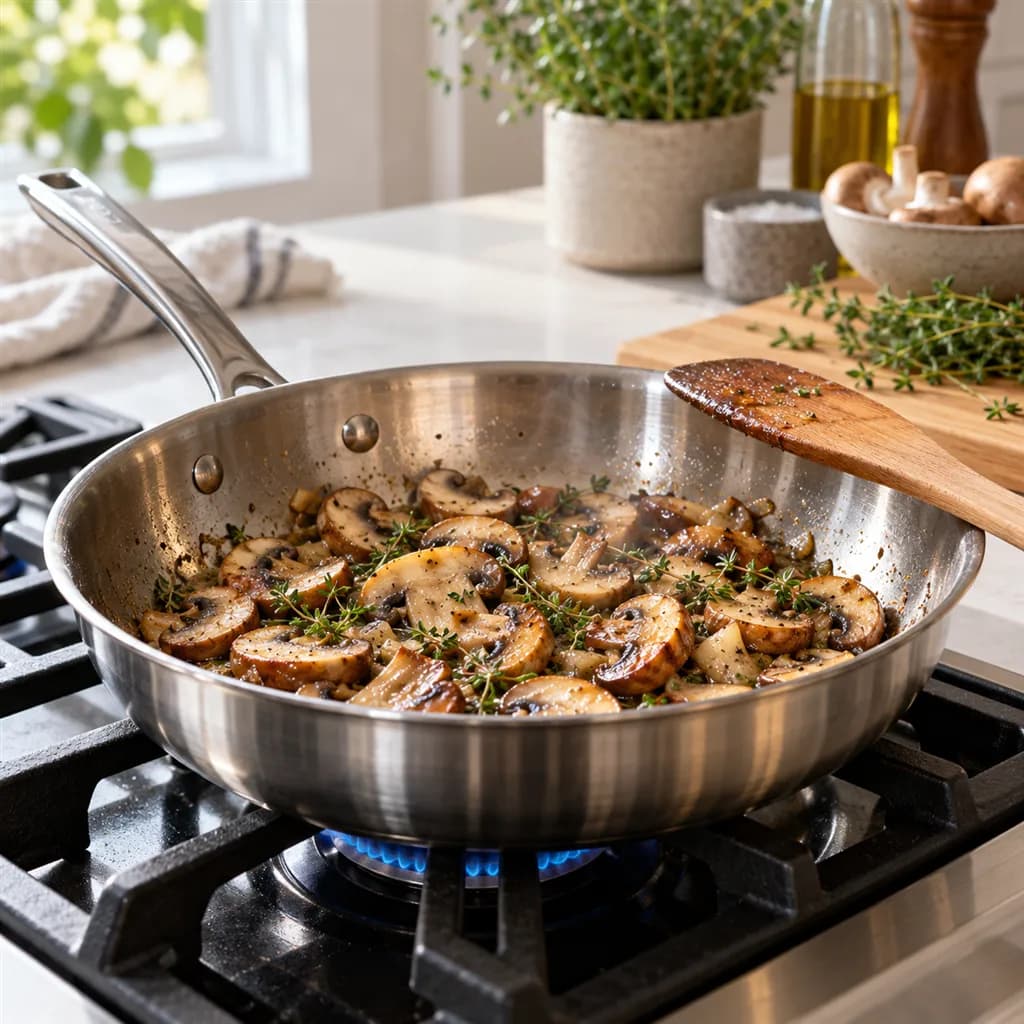
AI-generated lifestyle scene: a stainless steel frying pan on a gas hob in a bright modern kitchen
Lifestyle

Sample images AI-generated from a text description. Yours are made from your own product photo.

Kitchenware is a mix of surfaces that cameras struggle with. Polished stainless steel reflects the whole kitchen, photographer included; black non-stick swallows detail; enamel and glazed stoneware show every hotspot; and clear storage containers nearly vanish against white. Sets add their own problem. A 12-piece cookware set has to show twelve pieces, lids included, without looking like a pile of pans, and a gadget's attachments have to be countable at a glance.

Good kitchenware photos keep proof and appetite apart. The main image and close-ups prove the material: the clad layers at the rim, the rivets, the coating, the thickness of a base. Kitchen scenes then show the pan on a hob or the containers on a fridge shelf, sized against things buyers already own. AngleForge keeps the product as you photographed it and builds each view around it, so the photo you upload decides how much it can prove. A base you never photographed can't be shown truthfully, so if induction compatibility sells the pan, use your own photo of the base.

What shoppers check

The questions your photos have to answer

What is it made of?

The Detail shot gets close enough to read the material: the clad layers at a stainless rim, the speckle of a stone-effect coating, the texture of a silicone grip.

What exactly is in the set?

A Hero or Top-down shot of every piece together, lids on or beside their pans, answers it. Photograph the set the way it ships so nothing is missing.

How big is it compared with my hob or cupboard?

With scale sets the pan or container beside a hand or a mug, which reads faster than '24 cm' in the title.

Is the handle comfortable and secure?

The Side shot shows the handle's angle, length and rivets, and the 45° view shows where it joins the pan.

Do the lids seal, and do the containers stack?

A 45° shot of a closed container shows the clips and seal. If stacking or nesting is a selling point, photograph a stack, because every angle shows the product as photographed.

The shot list

Shots that sell kitchenware

A set of 8 images includes every shot on this list, because each set uses the angles in order. That is 16 credits at 2 credits an image.

  1. 1

    Hero

    The pan, set or gadget alone with every included piece in frame: the main image and thumbnail.

  2. 3

    45°

    The classic cookware view: the depth of the pan, the fit of the lid and the handle in one image.

  3. 4

    Side

    Wall height, handle angle, pouring spouts and rivets; for utensils, how thick the head is.

  4. 5

    Top-down

    Inside the pan or container: coating, measuring marks, compartments, or a utensil set laid out flat.

  5. 6

    Detail

    The material proof: a clad rim, rivets, coating texture, a grater's teeth or a lid's silicone seal.

  6. 7

    Lifestyle

    Styled with a few ingredients or tools; for a full kitchen with the pan on a hob, run a set on the Lifestyle scene background.

  7. 8

    With scale

    Next to a hand or a mug, so diameter and capacity make sense at a glance.

Settings to use

Start with these in AngleForge

Category
Home
Lighting mood
Clean
Background
Cut-out white
Set size
8 images
Open with these settings

6 free credits on sign-up for 3 test images · no card needed

Example brief

“Tri-ply stainless steel frying pan, 28 cm, with a riveted steel handle and a glass lid. Keep the brushed finish, the rivets and the stamp on the handle exactly as photographed; soft light with clean reflections and no food in the pan.”

Styling and light

  • Shoot stainless steel inside a light tent or a corner of white boards, so it reflects white. Polished metal looks only as good as whatever it's reflecting, including you.
  • Bring out a dark non-stick coating with soft light skimming low across the surface, which shows its texture without a glare spot.
  • For clear containers, put black card just out of frame on each side. The dark reflection outlines the walls so they don't vanish against white.
  • Peel off shop stickers and protective film and wipe away fingerprints and water marks before you photograph anything shiny.
  • Photograph sets the way they ship: lids on or leaning beside their pans, utensils fanned or in a neat row, so the count is easy to check.
Marketplace rules

What each marketplace expects

Rules change, so check the current category guide in your seller dashboard before you upload.

Amazon

  • According to seller guides on Amazon's image rules, the main image must show the entire product for sale and nothing that isn't included. A cookware set shows every pan and lid; food, spoons and oil bottles stay out.
  • The same guides say the main image shows the product outside its packaging, on pure white. A gift box can go in a later slot if it matters to buyers.
All Amazon image requirements

Flipkart

  • Integration guides that quote Flipkart's image rules ask for a white background on the primary image, a solo product without extra props, and no text, watermarks, price tags or stickers.
  • The same guides suggest images of 1000 × 1000 px or larger. Export a custom 2000 × 2000 on white for room to zoom, and check the category's own rules in Seller Hub.
All Flipkart image requirements

Shopify

  • Write alt text that names the material, size and colour, such as '28 cm tri-ply stainless frying pan with glass lid'. Shopify uses it for screen readers and when an image fails to load, and recommends 125 characters or fewer.
  • Shopify suggests 2048 × 2048 px for square product images. The Shopify preset exports that size, which leaves room to zoom in on a coating or a rivet.
All Shopify image requirements

Common kitchenware photo mistakes

  • The photographer, the window and the kitchen reflected in polished steel.
  • A cookware set shown without its lids, or with pieces that aren't in the box.
  • Food or oil in the main image, so buyers can't tell what they're paying for.
  • Shop stickers, price labels and protective film left on lids and handles.
  • No size cue: a 20 cm and a 28 cm pan look identical alone on white.
  • Implying induction compatibility with a generated view of a base that was never photographed.
FAQ

Kitchenware photography questions

Can AI photograph shiny stainless steel cookware?
Yes, if your photo is clean. AngleForge keeps the pan as photographed, including the reflections on it, and builds the backdrop and light around it. Shoot the steel inside a white space so it reflects white, wipe off fingerprints and stickers, and check each image for stray reflections before you publish.
How do I photograph a cookware set?
Arrange every piece the way it ships, lids on or leaning against their pans, and photograph the whole group from slightly above. Upload that photo: every angle in the set keeps the same pieces. On Amazon the main image should show the entire set and nothing extra, so count the pieces against your title.
Can it show my kitchenware in use, with food?
Run a set on the Lifestyle scene background and describe the kitchen and the food in the brief, for example 'pan on a gas hob with sliced mushrooms'. Keep food out of the white main image, and check that any food shown suits the product, since buyers read it as a claim about what the pan can do.
Does the angle tool add measurements or feature labels?
No. Angle images carry no text. For a dimensions image or callouts such as 'oven-safe to 260 °C', use the Amazon listing image generator, which builds a seven-image gallery with a dimensions slot and text callouts. Keep every callout to what your product actually does.
How much does a kitchenware set cost?
Each image costs 2 credits, so the 8-image set recommended here is 16 credits, and a 4-image kitchen scene set adds 8. Gadgets with attachments may want a 16-image set (32 credits) for the Components and In hand shots, with every attachment in your photo. Failed images are refunded, and packs start at $12 for 30 credits.

Related categories

Selling on Amazon?

Related guides

Your next listing, ready today

Sign up, upload a photo and your first image is ready in about 30 seconds. Make 3 images free, then pick a pack or plan. Your first credit pack comes with 50% extra credits.

  • 3 free images
  • No card needed
  • Failed images refunded