AngleForge
Kids & pets · Product photography

AI toy product photography

Toy photos are read by adults choosing for a child, often as a gift, so they have to show true size, true colour and exactly what comes in the box. AngleForge turns a photo of your toy into a white main image, a laid-out view of every piece, scale shots and playroom scenes with no children in them, sized for Amazon, Etsy and Flipkart.

  • Plush toys
  • Building sets
  • Wooden toys
  • Board games
  • Puzzles
  • Dolls & action figures
AI-generated hero shot: a wooden stacking toy with six pastel-painted rings on a natural beech peg
Hero
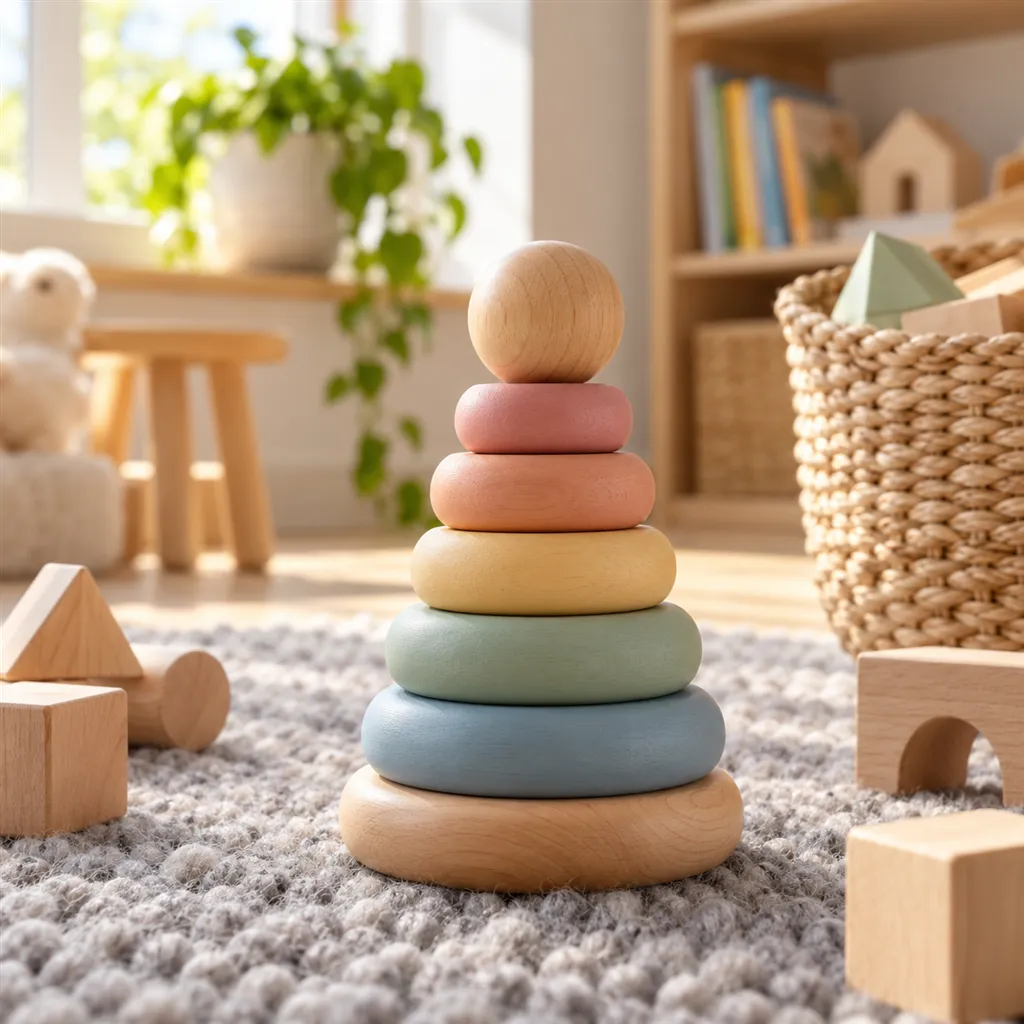
AI-generated lifestyle scene: a wooden stacking toy with pastel rings on a soft grey wool rug in a bright playroom
Lifestyle

Sample images AI-generated from a text description. Yours are made from your own product photo.

Toys are bought by one person for another. A parent, grandparent or friend is choosing for a child who isn't there, and the listing photos are all they have to go on. They want to know how big the toy is, what comes in the box and whether it will look as bright and sturdy at home as it does on screen. The reviews toy sellers dread are about exactly those three things: 'much smaller than it looked', 'pieces missing' and 'not the colour in the picture'.

Toys also carry more rules than most categories. Safety warnings and age grading belong in the listing, marketplaces can ask for test documents, and the holiday season can bring extra selling conditions. AngleForge leaves the toy as you photographed it and stages each scene around it, so you get playroom and gift shots without a studio booking and without putting a child in front of the camera.

What shoppers check

The questions your photos have to answer

Will it fit in small hands, or on the shelf at home?

The With scale shot sets the toy next to an adult hand or a mug, so a 20 cm teddy and a 45 cm teddy stop looking identical on white.

What exactly is in the box?

The Components shot spreads out every piece you photographed in an even grid, so buyers can count bricks, cards and figures before ordering.

Will it look good as a gift?

If your photo includes the box, the Packaging shot shows the toy beside it. With no box in the photo, the tool puts the toy on a simple display riser and never invents box art.

Is it right for my child's age?

A Lifestyle scene styled for the age group, such as a soft rug for toddlers or a table set for a family game, shows who the toy is for. The age grading itself belongs in the listing text.

The shot list

Shots that sell toys & games

A set of 16 images includes every shot on this list, because each set uses the angles in order. That is 32 credits at 2 credits an image.

  1. 1

    Hero

    The toy alone, assembled and out of its packaging, as the main image and search thumbnail.

  2. 3

    45°

    Two sides and the depth at once: the side and roof of a dolls' house, the wheels of a truck, the thickness of a puzzle board.

  3. 5

    Top-down

    The overhead view for flat things: a play mat, a finished jigsaw, a game board laid out.

  4. 6

    Detail

    Seams and embroidered eyes on plush, sanded edges and paint on wood, the studs on building bricks.

  5. 7

    Lifestyle

    A playroom rug, a shelf or a kitchen table, styled for the age the toy suits, with no children in the frame.

  6. 8

    With scale

    A familiar object beside the toy, which settles the size question for plush, figures and vehicles.

  7. 13

    Components

    Every loose piece laid out and evenly spaced. Shoot the set unboxed and spread out, because only parts in your photo appear.

  8. 15

    Packaging

    The toy next to its box for gift buyers; this needs the box in your photo.

Settings to use

Start with these in AngleForge

Category
Home
Lighting mood
Clean
Background
Cut-out white
Set size
16 images
Open with these settings

6 free credits on sign-up for 3 test images · no card needed

Example brief

“Wooden stacking toy with six painted rings on a beech peg. Keep the paint colours and the wood grain exactly as photographed; bright, even light. Lifestyle on a pale playroom rug with a few wooden blocks. No children or people in any shot.”

Styling and light

  • Keep colours accurate, because children ask for 'the red one' by name. The Clean style gives neutral light for listing images; Bold pushes saturation, which suits a social post better than a main image.
  • Style scenes for the age on the box: a soft rug and a low shelf for under-threes, a desk for a 1,000-piece jigsaw, a family table for a strategy game.
  • Light plush from the side to show the pile; flat front light makes fur look like felt.
Marketplace rules

What each marketplace expects

Rules change, so check the current category guide in your seller dashboard before you upload.

Amazon

  • Compliance guides summarising Amazon's rules say sellers must add applicable hazard warnings, such as a choking warning for small parts, to the product detail page and, when necessary, the product label.
  • The same guides say Amazon can ask for a Children's Product Certificate, test reports from a CPSC-accepted lab and product photos during compliance checks. Send photos of the real toy for those.
  • Seller guides report that each year Amazon sets extra holiday selling conditions, based on order history and shipping performance, for toy sellers who fulfil orders themselves (FBM); FBA sellers are not affected. Check this year's thresholds in Seller Central before Q4.
All Amazon image requirements

Etsy

  • Etsy's updated Children and Baby Products policy took effect on June 2, 2026, with clearer restrictions on products with small parts that may pose choking or ingestion risks. Read it, and the Seller Handbook guide it links to, before listing handmade toys.
  • For handmade toys, put a Detail shot of the stitching or wood finish early in the gallery; it is the closest a buyer gets to picking the toy up.
All Etsy image requirements

Flipkart

  • Toys sold in India must meet the mandatory BIS requirements of the Toys (Quality Control) Order, 2020. In 2026 India's Central Consumer Protection Authority fined Flipkart for hosting toys that did not and ordered it to keep them off the platform, so have your BIS certification in place before you list.
All Flipkart image requirements

Common toys & games photo mistakes

  • Figures, batteries or accessories sold separately appearing in the main image, which invites 'not as pictured' complaints.
  • A close crop on white with nothing beside it, so a palm-sized figure looks large.
  • Saturation pushed up until plastic looks glossier and brighter than the real toy.
  • Scenes styled for the wrong age, such as a baby nursery for a toy graded for eight and up.
  • A finished building set with no shot of the loose pieces it starts as.
FAQ

Toys & games photography questions

There's no toy category in the angle tool. Which one should I pick?
Match the material. Home suits wooden toys, plush, puzzles and board games: it renders wood grain and fabric faithfully and keeps objects at real-world size. Electronics suits remote-control cars, robots and toys with buttons or screens, because it keeps controls where your photo shows them. Use the Clean style with either for true colours.
Can I show children playing with the toy?
Leave children out of toy images. Playroom scenes, an adult hand or a toy basket give the same sense of play without the consent questions a child's face raises. Write 'no children or people' in your brief and look through every Lifestyle render before you publish.
Does AngleForge add choking warnings or age labels to images?
No. The angle tool makes photos without text; warnings and age grading go in the listing fields and description. For callouts such as piece counts or dimensions on secondary images, the Amazon listing image generator builds a 7-image gallery with text.
Can it show every piece of a building set or board game?
Yes, if your photo shows them. Photograph the set unboxed with every piece spread out on a plain surface; the Components render arranges what it can see into a tidy grid and adds nothing. Count the pieces in the render against the box before the listing goes live.
How many credits does a toy set use?
Each image costs 2 credits. The shots on this page need a 16-image set, so 32 credits, because Components and Packaging sit near the end of the angle order. A one-piece toy without a box is covered by an 8-image set for 16 credits. New accounts get 6 free credits for 3 test images, and packs start at $12 for 30 credits.

Related categories

Selling on Amazon?

Related guides

Your next listing, ready today

Sign up, upload a photo and your first image is ready in about 30 seconds. Make 3 images free, then pick a pack or plan. Your first credit pack comes with 50% extra credits.

  • 3 free images
  • No card needed
  • Failed images refunded